Internal Ops

Internal tools, built as parts

Modular internal tools for your back office.

Internal Ops is how IT teams build internal tools as small, replaceable parts instead of one big platform. Each workflow runs as an assembly line of steps your team writes as code, on a worker you run. Each system of record holds one kind of data and has its own API.

For CIOs and the IT teams who build internal workflows. Usage-based pricing, no per-seat plans; rates aren’t published yet.

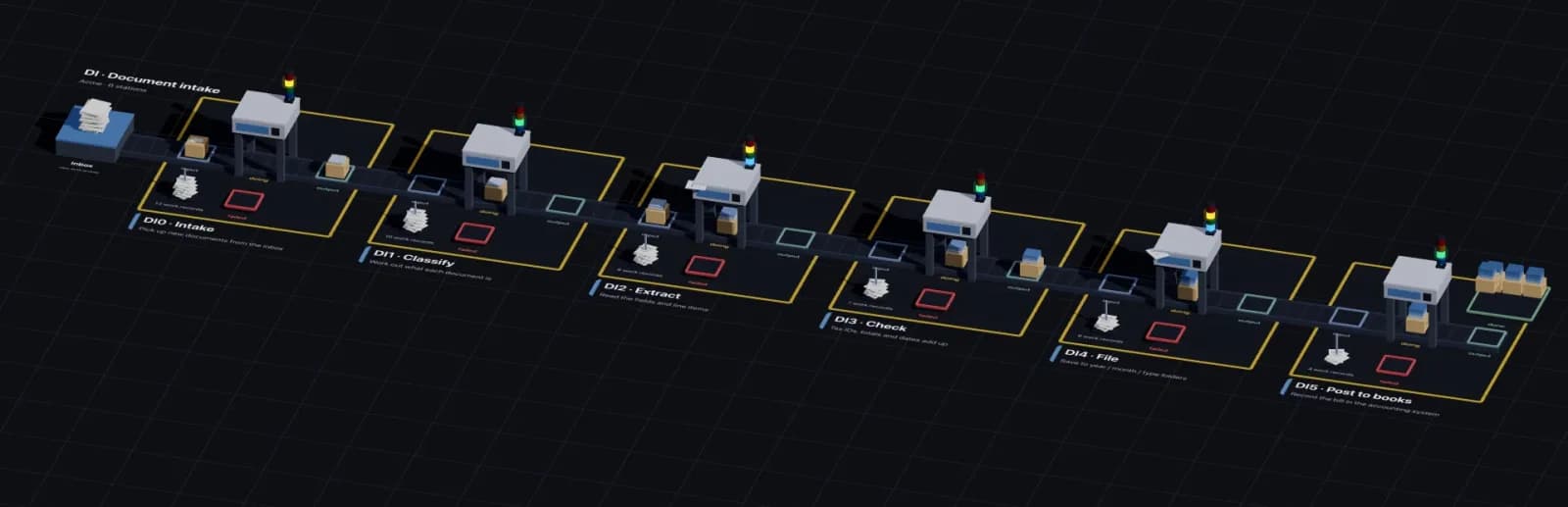
A document-intake workflow drawn as an assembly line: an inbox, then six stations named Intake, Classify, Extract, Check, File and Post to books, each with input, output and failed trays.
One workflow, as an assembly line: documents enter at the inbox and move station to station. Each station’s trays show what’s waiting, in progress, done or failed. (Acme is a fictional company.)

How it works

Two building blocks, each one replaceable.

Most internal tools are a mix of work that moves and data that stays. Internal Ops builds each as its own small part.

Work that moves

Workflows

Each workflow is an assembly line: a few stations, each running steps your team writes as code, on a worker you run. Every run is recorded, and failed work is kept with its error until someone fixes it.

  • Steps are code in your own Git repo
  • Every run recorded as a work record
  • Failures kept in a failed bin, never lost

Data that stays

Systems of record

Each system of record holds one kind of data, in its own app with its own API. Workflows read from and write to them. Replace one without touching the others.

  • One kind of data per system
  • Its own app and API
  • Finance already works this way

Why parts

One big platform, or parts your team owns.

QuestionOne internal-tools platformInternal Ops
Where does the workflow logic live?In the platform’s builderIn code, in your team’s Git repo
Where does the work run?Wherever the platform runs itOn a worker you run, next to your data
What happened on Tuesday’s run?Whatever the platform logsA work record for every run, with each step’s output
What happens to work that fails?Whatever the platform does with itIt stays in a failed bin with its error until fixed
Changing one partOn the platform’s termsReplace one workflow or one system on its own

Example workflows

Workflows teams have built this way.

Each was built for a specific team and isn’t packaged as a template yet. Your IT team builds its own from the same parts.

Document intake

  1. Pick up from email or a shared drive
  2. Classify
  3. Extract fields
  4. File

Documents arrive in one place, already sorted and read.

Proposal generation

  1. Gather inputs
  2. Draft the document
  3. Send for review

A first draft waiting for review instead of a blank page.

System-to-system sync

  1. Read new records
  2. Map fields
  3. Write to the other system

Two systems that agree, without copy and paste.

Statement verification

Finance · FinOpsBricks
  1. Discover statements
  2. Deterministic checks
  3. AI review
  4. Report

Every statement checked, with a report of what didn’t add up.

Already built this way

Finance is the first domain.

FinOpsBricks is finance built as parts: separate systems of record for Statements, Transactions and the Ledger, each with its own app and API, and finance workflows on the same engine. Internal Ops is the same approach for the rest of the back office.

See FinOpsBricks →

For your IT team

Built on Assembly Line.

Every workflow runs on Assembly Line. Your team starts from an open-source worker template, writes steps in Node.js, runs them on their own machine, and lets coding agents help.

Assembly Line quickstart →

Questions

Frequently asked.

What is Internal Ops?

Internal Ops is how IT teams build internal tools as small, replaceable parts instead of one big platform: workflows that run as assembly lines of code steps on your own worker, and small systems of record, each with its own API.

Who is Internal Ops for?

CIOs and heads of IT whose back office runs on spreadsheets, email and a platform nobody can change, and the IT teams who build and run the workflows.

How much does Internal Ops cost?

Pricing is usage-based, with no per-seat plans. Rates aren’t published yet.

Is it a no-code tool?

No. Your IT team writes each step as code, in a Git repo started from an open-source template. Coding agents such as Claude Code can write and debug steps with them.

Where does our data stay?

Workflows run on a worker your team runs, on your machine or server, so your data and your credentials for other systems stay there. The Orchestrator schedules runs and keeps a record of each one.

What is ready today?

The engine (Assembly Line), the open-source worker template and CLIs, and the finance systems of record in FinOpsBricks. The example workflows on this page were built for specific teams and aren’t packaged as templates yet.

How does Internal Ops relate to Assembly Line and FinOpsBricks?

Assembly Line is the engine every workflow runs on. FinOpsBricks is finance built this way. Internal Ops is the same approach for the rest of the back office.
Build your back office in parts.

Sign up, then hand your IT team the quickstart.